Wallet is the new App
The loyalty card your customers always have on their phone.
WalletHero is a complete loyalty system built on Apple Wallet and Google Wallet passes. Customers join by scanning a QR code, and their points, tier and rewards update right on the pass.
- Nothing to install The wallet is already on your customer's phone.
- Apple and Google One pass design covers both wallets.
- Data in the EU Database and files are hosted in Frankfurt.
Step 1 / 4 A push lands on the lock screen — no app needed
Step 2 / 4 Tap → the branded pass opens in the wallet
Step 3 / 4 The back of the pass links to everything
Step 4 / 4 Stamps and rewards — live on the pass
An app, a plastic card, or the wallet?
A loyalty program only works if the customer has it with them and you have a way to reach them. Here is how the three options compare.
| Your own app | Plastic or paper card | WalletHero Wallet pass | |
|---|---|---|---|
| Joining | Find it in the store, download, register, log in | Handed over at the till, often with a paper form | Scan a QR code, fill in a short form, add the pass |
| At hand when paying | Only if it was never uninstalled | Often left at home or lost | Next to payment cards and tickets |
| Reaching the customer | Push, for those who kept the app | None | Lock-screen notifications sent through the pass |
| Balance and status | Visible after opening the app | Stamps you can't count or correct remotely | On the pass itself, updated after every purchase |
| Knowing your customers | Profile and history | The customer stays anonymous | Profile, purchase history and marketing consent |
| Getting started | A development project, then upkeep in two app stores | Printing, and reprinting | Set up in a browser, without developers |
Three steps from an idea to a running program.
You don't replace your till and you don't commission an app. You design the pass, invite customers, and reward them on every visit.
-
Design the pass and set the rules
Pick colors, logo and fields in the editor. Decide what earns points, where the tiers start and which rewards are worth collecting for.
-
Invite your customers
Put a QR code on the counter, the table or the receipt, and share the link online. The customer fills in a short form and adds the pass to their wallet.
-
Reward every visit
Staff scan the pass in the app, or the purchase arrives from your POS. Points are added, the pass updates, and campaigns bring customers back.
Everything a loyalty program needs, in one system.
Five areas, from the pass on the phone to the report on your desk.
The pass
One pass design. Both wallets.
The pass is the face of your program and its channel to the customer. You design it in the browser, and every change reaches your customers' phones without them doing anything.
Pass editor
Design the pass in minutes, with a live preview.
One editor covers the whole pass: colors, logo, cover image, fields, the scannable code and the back of the pass with its links. Drop variables into any field and the preview renders with a real customer's data.
- One template for Apple Wallet and Google Wallet
- Variables in any field: name, points balance, tier, your own fields
- QR, Aztec, PDF417 and Code 128 — for the scanner you already own
- Basic Information Template name, pass type, and basic settings
- Design & Branding Colors, images, and visual appearance
- Top Field Logo text and header field displayed at the top
- Primary Fields Main information displayed prominently on the pass
- Secondary Fields Additional information below primary fields
- Barcode QR codes and other scannable elements
- Locations Location-based notifications and services
- Back of Pass Additional information and links
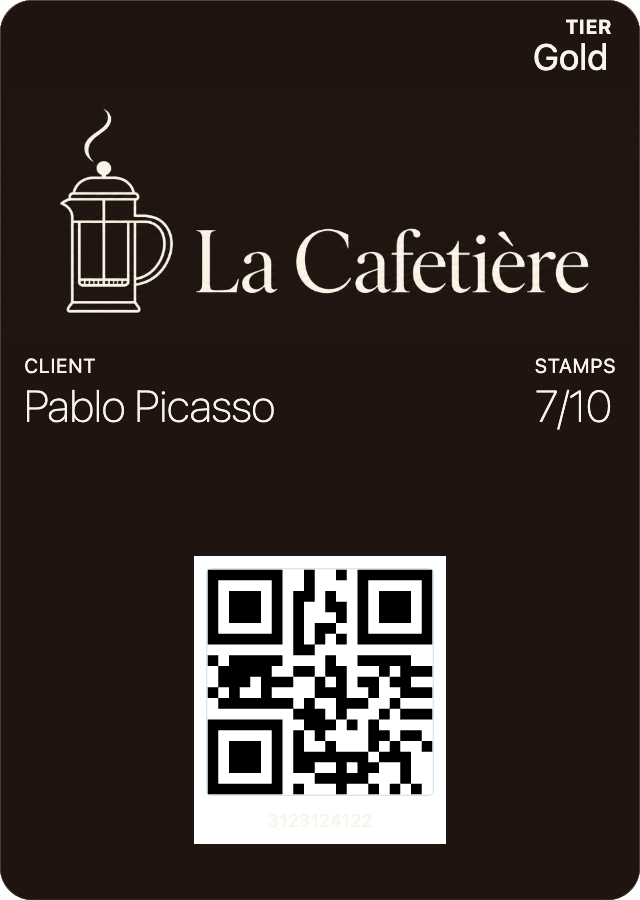
 La Cafetièrenow Notification message
-
Live updates
Change a balance, a tier or the template itself, and the pass in the customer's wallet updates on its own.
-
A reminder near your door
Add your locations and the pass surfaces on the lock screen in Apple Wallet when a customer is nearby.
-
A look for the occasion
Switch to a seasonal or event design for a set period. When it ends, the previous design comes back.
-
Passes under your name
Connect your own Apple certificate so your company appears as the issuer of the pass.
Sign-ups
From a QR code to a pass on the phone.
The customer scans a code, leaves their details and consent, and adds the pass to their wallet. You get a customer profile instead of an anonymous stamp.
Sign-up pages
One form, many ways into the program.
Each sign-up page is ready to use and has its own address. Share it as a QR code on the counter, as a link on social media, or as a form embedded on your own website.
- You choose the form fields and which of them are required
- The pass is delivered on screen, by e-mail, or both
- Your team gets an e-mail about every new sign-up
-
A website for the program
Publish a landing page at yourbrand.wallethero.app, with version history, a preview before publishing and a list of form submissions.
-
Referral program
Every customer gets a referral code. You set the reward for a completed referral with an automation rule.
-
Straight into a tier
A separate form for VIP guests, staff or partners can assign a tier at sign-up.
-
A form on your site
Embed the sign-up on your own or a partner's website. The public token only works from the domains you allow.
Program
Points, tiers and rewards, on your rules.
You set the rules once. Earning, promotions and expiry are then calculated for you, and the customer sees the result on the pass.
Points and rewards
One currency or several, each with its own rules.
Points, stamps and store credit are separate currencies, each with its own name, expiry and cap. Customers spend them in a rewards catalog you fully control.
- Point expiry, with a reminder before the date
- Rewards with stock, an availability window and a per-customer limit
- Rewards shown only to a chosen tier or segment
- Purchase · Maison Café +25
- Referral completed +200
- Redeemed · Free Coffee −200
- Free Coffee Redeem
- 10% Off Next Order Redeem
- Premium Membership Gold+
Tiers
Tiers that run themselves.
Choose what counts toward promotion: points earned, money spent or number of purchases. WalletHero promotes and demotes customers for you, and the pass changes its look with the tier.
- Automatic promotion and demotion over a period you choose
- A pass design and a list of benefits for each tier
- Invite-only tiers, and temporary ones that expire on their own
Automations
A rule reads like a sentence.
When something happens, the customer gets something. You pick a trigger, conditions and an effect — no flowchart canvas. Rules run side by side, so a birthday bonus doesn't switch off everyday earning.
- Triggers: purchase, visit, birthday, referral, pass installed, schedule
- Conditions: tier, balance, segment, purchase amount
- Effects: points, reward, tier change, push, pass design switch, webhook
- WHEN transaction amount ≥ €30 THEN earn_points +50 points
- WHEN time_based birthday · annual THEN give_reward Free dessert
- WHEN referral referral_completed THEN earn_points +200 to referrer
-
Coupons with codes
A reward can generate a coupon code from a pattern you define, ready to be entered at the till.
-
A birthday gift
A scheduled rule reads the birth date from the profile and grants a reward or points on the day.
-
Pending points
Set a waiting period before points from a purchase become spendable — useful where returns are common.
Messaging
A reason to come back, on the lock screen.
The wallet pass is also a way to reach the customer. Your message arrives on their phone without an app, without a phone number and without paying per text.
Push notifications
Push notifications. Without an app.
You send messages through the pass, and they show up on the lock screen in Apple Wallet and Google Wallet. A change of balance or tier can carry its own message too.
- Works for everyone who added the pass — nothing else to install
- Messages about a promotion or a redeemed reward go out on their own
- Marketing sends reach only customers who gave consent
“+25 points. Your balance: 1,240” — sent when the purchase is added
The pass surfaces on the lock screen in Apple Wallet
Campaigns
Pick the audience, pick the action, send.
A campaign is more than a message. In one send you can notify customers, grant them a reward, move them to another tier or switch the design of their pass.
- Audience: a segment or a hand-picked list of customers
- Send now or schedule for a specific time
- A report afterwards: who was reached, who wasn't, and why
- send_push “Double points this weekend — 2× on every coffee.”
- give_reward Free pastry · expires in 14 days
- assign_tier Gold → VIP for top 50 spenders
-
Segments
Group customers by tier, balance, total spend, last activity or your own fields. Or simply take your top customers.
-
Consent is enforced for you
Marketing consent is stored with its date and source. A campaign skips everyone who didn't give it or took it back.
-
Win-backs on a schedule
A recurring rule with a segment condition can nudge customers who haven't bought from you in a while.
Daily use
A second at the till. The full picture in reports.
Staff scan the pass with a phone, customers check their own balance and rewards, and you see whether the program pays for itself.
Staff app
Scan the pass, serve the customer.
An app for iOS and Android for the people at the counter. One scan shows the customer, their tier and rewards; one button adds a purchase, adds points or redeems a reward.
- You choose the action buttons — only what your staff need
- Separate roles for the administrator and for staff
- Sign-in with a password, a pairing code or a Google or Apple account
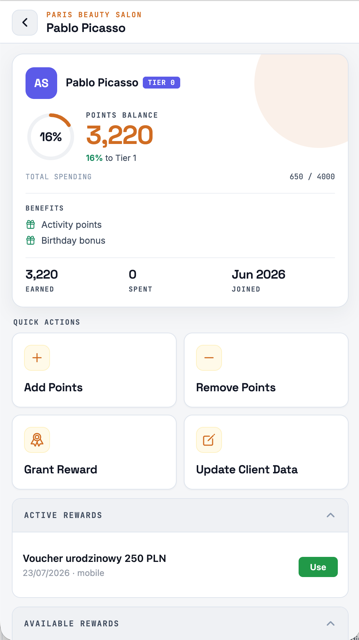
Customer portal
A customer account with no app and no password.
A link on the back of the pass opens a portal in your colors. The customer checks their balance, tier and benefits, redeems points for rewards on their own and manages their consent.
- Balance, tier, rewards, redemption history and referral code
- Your logo, colors, welcome text and custom CSS
- Customers can withdraw consent or delete their account themselves
- Free Coffee Redeem
- 10% Off Next Order Redeem
Reports
See whether the program pays for itself.
Four groups of reports: revenue, customers, loyalty and passes. Every table exports to CSV.
- Revenue, number of purchases and average order value
- New and returning buyers, and the repeat purchase rate
- Points earned, spent and expired; the most popular rewards
-
Customer profile
One person's purchases, passes, balances, available rewards and referrals on a single screen.
-
Roles and permissions
Ready-made roles for an administrator, a client manager and a program manager. Build your own from individual permissions.
-
Several brands, one account
Each brand is a separate project with its own passes, team and analytics.
-
Your own data fields
Add what matters in your trade to the customer profile: a favorite table, a skin type, a size.
One system, a different program for every trade.
The same building blocks make a different program for a restaurant, a café and a salon. Here are four ways to start.
-
Restaurants
Points on every bill, tiers for your regulars.
- Bills from the POS add points automatically
- Each tier has its own pass design and benefits
- A push campaign for the quieter days of the week
-
Cafés and bakeries
A stamp card nobody can lose.
- Stamps as your own points currency
- The tenth coffee as a reward in the catalog
- One scan in the staff app at the till
-
Beauty and barber
Visits that build status on their own.
- Visits and purchases arrive from the salon system
- A birthday gift granted by an automation
- Referrals rewarded with points
-
Shops and local services
If customers come back, it fits.
- Points in proportion to the purchase amount
- Coupons with codes in the rewards catalog
- Campaigns sent to chosen segments
Connect the system you already work on.
Purchases from your POS arrive in WalletHero as transactions and trigger the same rules as a scan in the staff app. Nobody types anything twice. Ask during the demo whether your system is already connected.
-
Sales sync
Closed bills reach WalletHero automatically and add points without a scan.
-
Sales history
Where the system allows it, past sales can be imported into the program.
-
Discounts at the till
In selected systems, the customer's tier discount goes back to the POS.
-
Salon software
Visits and purchases from salon software are fetched automatically.
import { WalletHero } from '@wallethero/sdk';
const wh = new WalletHero({ apiKey: WH_API_KEY });

// create a member and award points
const client = await wh.clients.create(ws, {
  email: '[email protected]',
});

await wh.loyalty.earnPoints(ws, {
  client_id: client.id, points: 50,
});And for everything else, an API.
-
REST API
Customers, points, rewards, tiers and passes, available to your own systems.
-
TypeScript SDK
The same API as a typed client library.
-
Webhooks
About 25 event types, signed, with automatic retries and a delivery log.
POS integrations, the API and webhooks are part of the Enterprise plan.
Built in the EU, with GDPR in mind from day one.
You remain the controller of your customers' data. We process it on your behalf, under an agreement, on infrastructure in the European Union.
-
Data hosted in the EU
The production database and file storage run in Frankfurt. Every subprocessor and what it is used for is on a public list.
-
Data processing agreement included
The GDPR Art. 28 agreement is an annex to the terms of service. You don't negotiate it separately or pay extra for it.
-
Consent and erasure built in
Marketing consent is recorded with its date and source. A customer can withdraw it or delete their account in the portal, and you can anonymize any record from the dashboard.
Privacy policyTerms of serviceData processing agreementCookie policySubprocessors
Questions we hear most often.
Something else on your mind? Write to [email protected].
Do my customers need to install an app?
No. The pass goes into Apple Wallet on an iPhone or Google Wallet on Android — the same place people keep payment cards and tickets. The customer scans a QR code, fills in a short form and taps “Add”.
Does it work the same on iPhone and Android?
You design one template and WalletHero issues it for both wallets. Balance updates and push notifications work on both. One difference: the lock-screen reminder near your location is an Apple Wallet feature.
Do I have to replace my POS?
No. The simplest setup needs only a phone with the staff app: scan the pass, add the purchase. If your POS is already integrated with WalletHero, purchases flow in automatically. Other systems can be connected through the API.
How do customers join the program?
Through a sign-up page that you share as a QR code, a link or a form on your own website. You choose which details to ask for. The pass appears on screen right away, arrives by e-mail, or both.
How do notifications work, and do I pay per message?
Notifications are sent through the pass and appear on the phone's lock screen. They don't go through a mobile carrier, so there is no per-message charge as there is with SMS. Marketing messages reach only customers who gave consent.
Can I run several brands or venues?
Yes. Each brand is a separate project in one account, with its own passes, team and analytics. Purchases can be tagged with a venue, and revenue reports can be filtered by it.
What about GDPR?
You are the data controller and WalletHero is the processor. The data processing agreement is an annex to the terms of service, the data is hosted in Frankfurt, and the list of subprocessors is public. Consent, its withdrawal and account deletion are handled inside the system.
How much does it cost, and how do I start?
We don't publish a price list yet. We match the plan to the number of venues and the modules you need, and you get a concrete offer after the demo. We set up accounts ourselves after that call, and help you configure the first pass.
Book a demo
See it on your own brand.
A 20-minute walkthrough with a sample pass in your colors — your tiers, your rewards, your point of sale.
- We build a sample pass in your brand before the call
- Live walkthrough of joining, earning and redeeming
- Honest fit check — no slides, no pressure
Thanks — got it.
We'll come back to you within one business day, with a sample pass in your brand.